How We Structure Google Ads Conversion Actions (The Right Way) After Importing From ServiceTitan
 Bri SkiffingtonChief Executive Officer
8min read
Contents
If your Google Ads account is optimizing for phone calls from the same customer five times in one day… you’re not optimizing for revenue, you’re optimizing for Karen.
That’s the problem with most Google Ads setups: too many conversions, too much noise, and not enough clarity on what actually drives ROAS.
Most PPC managers miss the crucial post-import step even if they are using ServiceTitan Marketing Pro Ads: properly editing each conversion action for count method, attribution window, and optimization priority. The result? Duplicate conversions, inflated performance reporting, and Smart Bidding stuck chasing the wrong signals.
We fix that, every time.
Here’s how we structure conversion actions from ServiceTitan Marketing Pro Ads to give Smart Bidding the cleanest, highest-fidelity signals possible, and avoid the common traps that break your ROAS
before it ever has a shot.
What It Enables
ServiceTitan Marketing Pro Ads doesn’t just pass form fills and phone calls into Google Ads, it gives you something most trades advertisers have never had: the ability to optimize for actual job value.
Whether you’re passing through:
Actual revenue from closed jobs, or
Job Value Prediction (JVP)
from ServiceTitan’s AI model (when jobs aren’t complete yet),
…you’re no longer guessing what a conversion is worth. You’re telling Google:
This lead is projected to bring in $12,748, go find more like it.
That changes the game entirely.
It means Smart Bidding is trained on real downstream value, not just lead signals like call duration or form fills. It means you can shift from Cost Per Lead to Return on Ad Spend (ROAS)… and you can do it with confidence.
But only if you configure those imported conversions correctly.
What JVP Is & Why It Matters (a Lot)
Job Value Prediction (JVP) is ServiceTitan’s AI-powered estimation of how much revenue a booked job will generate. It uses historical performance, job type, technician, geography, and more to give Google Ads a real-time revenue signal, even if the job hasn’t closed yet.
That’s a big deal. Because in trades, there’s often a huge lag between booking a job and collecting actual revenue.
Why That Lag Breaks Hurts ROAS Optimization
For HVAC, the job might run same day, but the invoice could close days later.
For high-ticket installs or custom work, jobs might not be complete for weeks.
In cases like garage doors or remodels, it could take 12+ weeks to close the loop.
If you’re relying solely on completed-job revenue for bidding signals, you’re always optimizing on stale data, sometimes 2–12 weeks behind the current funnel.
Now imagine trying to scale during summer with performance decisions based on May bookings. That’s a losing play.
Why JVP Solves It
JVP gives you the predicted value at the time of booking, and updates it retroactively once the job completes and revenue is finalized. That means:
You get immediate performance data for Smart Bidding
You still get corrected revenue later for reporting accuracy
You’re no longer flying blind or waiting weeks to make strategic shifts
It’s the best of both worlds: fast signals for optimization, and accurate data for ROAS tracking.
Real-World Example: Garage Doors
Take a garage door company selling custom doors:
The lead books a tech consult
The door is sold and ordered, but install won’t happen for 8 to 12 weeks
With normal revenue tracking, that lead looks worthless until Q4.
With JVP? You immediately see a projected $8,400 in job value tied to the ad click that generated it, and you can double down on what worked while it’s still working.
Why We Use JVP (And Stopped Trying To Build A Cheaper One)
We abandoned any effort to build our own value model years ago. There’s just no competing with the volume of data ServiceTitan has:
Tens of millions of historical jobs
Hundreds of variables per transaction
Constant model refinement and revenue correction baked in
We focus on performance strategy, not reverse-engineering machine learning models that have already won.
Our Cheat Sheet: The Free Agency Conversion Settings Framework
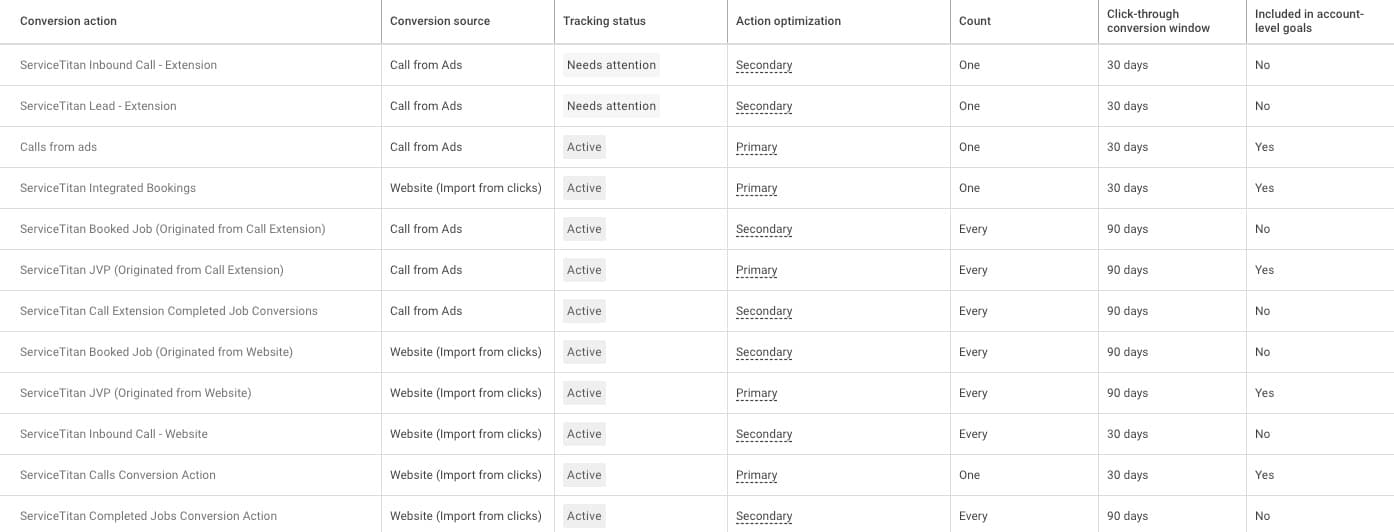
Once those conversion actions land in Google Ads from ServiceTitan Marketing Pro Ads, we don’t leave anything to chance. Here’s how we structure everything to ensure bidding trains on real value and attribution stays clean.
Primary Conversions (Train Smart Bidding)
Only these should be set to Primary, included in account goals, and factored into ROAS optimization.
| Conversion Action | Count | Window | Optimization | Notes |
|---|---|---|---|---|
| ServiceTitan JVP (Originated from Website) | Every | 90 Days | Primary | Projected revenue from web leads |
| ServiceTitan JVP (Originated from Call Extension) | Every | 90 Days | Primary | Projected revenue from ad extension calls |
| ServiceTitan Integrated Bookings | One | 30 Days | Primary | Web forms or SchedulePro to bookings |
| ServiceTitan Calls Conversion Action | One | 30 Days | Primary | DNI Lead call tracking from site visitors |
| Calls from Ads | One | 30 Days | Primary | Ad extension calls (set threshold to >90s for quality) |
Why “One” vs. “Every”?
Contact actions (calls, bookings) use Count: One to avoid duplicates from frequent or indecisive contacts.
Revenue-based actions
(JVP) use Count: Every to capture all job value, even from repeat customers.
Pro Tip To improve match rates for contact-based conversions, enable Enhanced Conversions for Web under Goals → Conversions → Settings in Google Ads (not inside individual conversion actions). Choose the Google tag setup method and allow automatic detection or provide a code snippet to capture hashed user data (like name, email, phone).
Secondary Conversions: Still Useful, Just Not Optimization Drivers
These should still be imported, but set to Secondary so they don’t influence bidding or ROAS reporting. They help you see funnel behavior, but shouldn’t train Google’s Smart Bidding model.
| Conversion Action | Why It’s Secondary |
|---|---|
| ServiceTitan Booked Job (Web or Call) | Already captured in JVP event (booking + projected revenue) |
| ServiceTitan Completed Job | Too delayed for Smart Bidding; better for reporting |
| ServiceTitan Inbound Call (Web or Call) | Valid, but those with the Lead qualifier are better |
Translation: track everything, but only optimize for the clearest, value-tied signals. That’s how you give Smart Bidding the right inputs and avoid chasing inflated or redundant outcomes.
The Exception (Specifically For The First ~30 Days)
Here’s where we contradict ourselves, temporarily.
The two call-based primary actions above, ServiceTitan Calls Conversion Action and Calls from Ads, are filtered. One requires a 60-second minimum call duration plus a “Lead” status in ServiceTitan. The other uses a >90s threshold to weed out junk. Long-term, those filters are exactly what you want feeding Smart Bidding.
But on day one? They’ll starve it.
Here’s why. Your CSRs are human. Early on, they won’t be used to the inevitable competitor calls that come in through as your PPC team is pruning search terms. A homeowner calls asking for another company, your CSR politely says “wrong number”, and excuses the call so it doesn’t count against their booking rate. That caller is calling for a service you provide, in your service area, but never gets the “Lead” tag. Google never sees a conversion. And you may think “good, I don’t want to be optimizing toward my competitors calls, they’re harder to book”, but you’d miss the point.
Multiply that across dozens of calls in your first two weeks. Google’s spending your money, seeing almost no conversions come back, and concluding your campaigns aren’t working. Smart Bidding starts pulling back. Clicks drop, impression share tanks, and you’re in a death spiral before the account ever had a chance. So, volume first, refine second.
The fix Flip the priority for the first 14–30 days.
Temporary primary actions (launch phase)
| Conversion Action | Count | Window | Optimization | Notes |
|---|---|---|---|---|
| ServiceTitan Inbound Call – Website | One | 30 Days | Primary | All unique DNI calls from site visitors, no duration or lead-status filter |
| ServiceTitan Inbound Call – Extension | One | 30 Days | Primary | All unique calls from ad extensions, no duration or lead-status filter |
During this phase, move ServiceTitan Calls Conversion Action and Calls from Ads to Secondary. They’ll still track, you just won’t optimize on them yet.
This gives Google a realistic volume of call conversions to learn from while your CSRs build the habit of tagging dispositions correctly. You’re trading signal precision for signal volume, which is the right trade when the algorithm has nothing to work with.
When to switch back Once you’ve hit roughly 30 conversions in 30 days on your primary call actions, the threshold where Smart Bidding has enough data to optimize reliably, swap them. Move the filtered actions (Calls Conversion Action and Calls from Ads) back to Primary. Move the unfiltered inbound call actions back to Secondary.
Think of it like breaking in a new dispatcher. You don’t hand them the most complex routing rules on day one. You let them take every call, learn the patterns, then tighten the criteria once they know what good looks like. Same logic applies to Google’s algorithm.
Bottom line The framework above is where you want to end up. But if you set it on day one, you’ll choke the algorithm before it learns anything. Give it volume first. Give it precision second.
Final Thoughts
ServiceTitan Marketing Pro Ads gives trades businesses something most platforms can’t: direct access to both actual revenue and predicted revenue through Job Value Prediction (JVP), seamlessly pushed into Google Ads. That means you’re not just optimizing for contact, you’re optimizing for what actually drives the business.
But when those conversions land in Google Ads, they don’t come perfectly pre-configured. And that’s where most setups fall short, not out of bad intent, but because no one teaches you how to clean it up.
Here’s what we’ve learned after rebuilding 100+ accounts:
JVP is your MVP, revenue signals > contact signals
Count contact actions once, not every time Karen calls
Use secondary conversions for context, not bidding
Give Smart Bidding clean signals so your budget chases profit, not noise
These aren’t hacks, they’re fundamentals. But fundamentals most people overlook. If you want Smart Bidding to act like a pro, you have to feed it like one.
Need a Second Set of Eyes?
We’ve helped trades businesses go from default setups to dialed-in ROAS
machines, often with nothing more than better signal prioritization.
Get it in your inbox, every Friday.
2,000+ trades owners already read it. Unsubscribe any time. @freeagency.ai on TikTok
Keep reading
More plays
UPDATED: ChatGPT Ads Manager Now Available For Local Services (May 2026)
On Friday, OpenAI quietly shipped state, DMA, and ZIP code geo targeting in the ChatGPT Ads Manager.
Read the play
How to Critique an SEO Report When the Graph Is Always Green
You’re in the quarterly review. Every chart is green, every arrow up, and your booked jobs are flat.
Read the play
New Study Correlates LLM Ranking Heavily With SERP Ranking. Is AEO Just SEO?
You saw the post on Facebook. An industry marketer you’ve followed for a while was announcing their proprietary AI Visibility Engine.
Read the play