Study: 60% of paid search calls aren’t leads. Is your CPA hiding them?
 Bri SkiffingtonChief Executive Officer
10min read
Contents
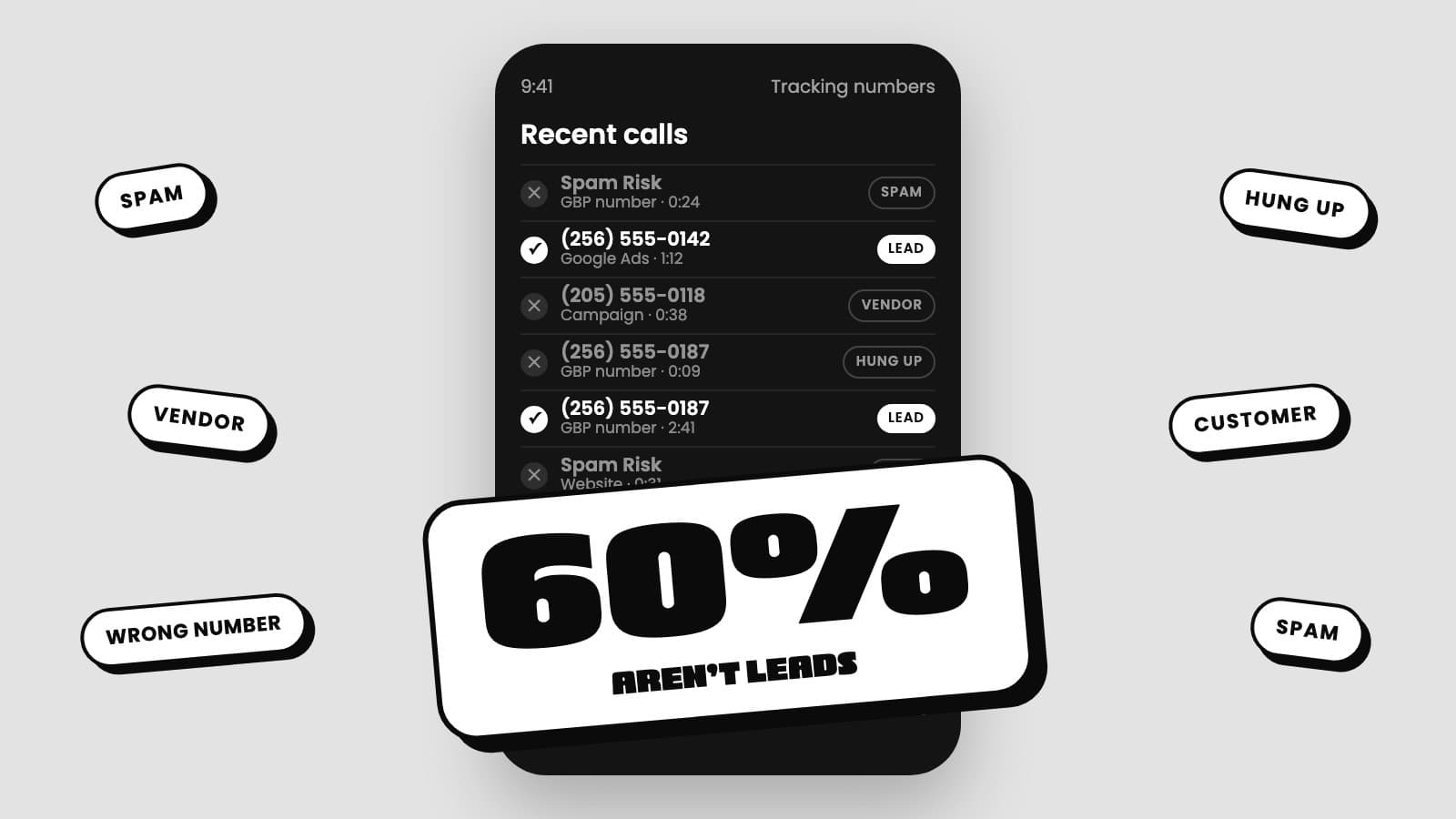
Invoca analyzed home services calls for its 2026 benchmark and found that of the paid search calls a person actually answered, only 40% were leads. The other 60% weren’t, and across all seven marketing channels Invoca measured, organic included, it’s 62%. Invoca’s public summary doesn’t break that bucket down, but anyone who has listened to their calls knows what’s in it: spam, vendors, wrong numbers, existing customers, the same person twice.
If you manage to CAC, none of that is shocking. It tends to land harder on operators who manage to cost per job, see a 90% booking rate in ServiceTitan, and conclude marketing should cost about $100 a job. Those numbers can be accurate and still answer a narrower question than they seem to.
Every common metric gets flattered from a different direction. An agency’s cost per lead is padded by every ring. Booking rate and cost per job are flattered from the other side, by excused calls and by customers who buy more than once. CAC is the one number neither side can skew. Below is the math on each, what’s actually in those non-lead calls, how to mitigate it, and a 10-minute version you can run yourself.
Invoca’s numbers put your real cost at 2x to 5x your “CPA”
The “CPA” on your report is cost per conversion, and a conversion is whatever the person who set up the account decided to count. Usually that’s every call and form. If you’re lucky, it’s unique calls over 60 seconds. Better, it’s ServiceTitan leads, though those come with their own flaw: CSRs decide what counts, and they have every reason to keep their booking rate high. Best is value-based tracking, where the platform learns what each job was actually worth.
If your account is on that first rung, what a real lead costs you is 2x to 5x the number on the report, because every ring counts and nothing dedupes to the human.
Invoca’s 2026 home services benchmark gives two paid search rates that matter here. Of answered paid search calls, 40% were leads. Of those leads, 48% converted on the call. Run the average Google Ads home improvement cost per lead through both and you get this:
| What the report says | What it actually costs |
|---|---|
| “CPA”: $90.92 per conversion (whatever the setup counted) | $90.92 |
| Per genuine lead (÷ 0.40) | about $227 |
| Per lead booked on the call (÷ 0.40, then ÷ 0.48) | about $474 |
Treat that as the size of the gap, not a benchmark. Invoca and WordStream don’t define “lead” the same way, and your numbers won’t match either. The point survives the imprecision: the number on the report and the number that hits your bank account are different numbers, and most of the difference is people who were never going to buy.
Here’s how the gap gets built. A robodialer hits your Google Business Profile number. A vendor calls your Google Ads number asking for the owner. A homeowner hangs up on the hold music and calls back four minutes later.
Your CSR marks two of those excused and books the third. ServiceTitan now says one lead. The ad platform says three or four conversions, and that’s the number on the agency report. Worse, if those calls flow back into Google Ads as conversions, the platform learns to go find you more of all of them. That’s the agency side of the skew.
Why 60% surprises operators who manage to cost per job
A 90% booking rate and a $100 cost per job can both be true and still tell you very little about what a new customer costs.
Start with booking rate. ServiceTitan calculates it on the calls that weren’t excused, and your CSRs decide what gets excused. Pull out the spam, the vendors, the wrong numbers and the repeat callers, plus the occasional real lead nobody could book, and what’s left books at 90%.
That’s not a lie. It’s a rate on the calls that survived the sorting. Read it as “marketing sends us mostly real customers” and Invoca’s 60% looks impossible.
Then cost per job. It divides spend by jobs, and one customer is often more than one job. A no-heat call becomes a diagnostic and then an install. A turnover comes with a maintenance visit. Some of those jobs belong to customers who already knew your number and would have called anyway. Here’s how that plays out with round, illustrative numbers:
| What you measure | Math | Result |
|---|---|---|
| Cost per job | $10,000 spend ÷ 100 jobs | $100 |
| Cost per customer | $10,000 ÷ 60 customers behind those jobs | about $167 |
| CAC | $10,000 ÷ 35 customers who had never bought before | about $286 |
Same month, same spend, nearly 3x apart. Plug in your own numbers and the gap will be different, but it rarely runs the other way.
So the agency’s cost per lead runs cheap because it counts too many leads, and cost per job runs cheap because it counts too many jobs. CAC is the equalizer: total marketing spend divided by customers who had never bought from you before. Rings, tags and second jobs don’t move it. Only a new customer paying you does. It’s also the number with the most room to come down.
What the junk actually is
Invoca tells you how much of your call volume isn’t leads. Call logs show what it is, and it isn’t what most spam advice assumes.
We studied a full year of tagged spam and vendor calls at two HVAC companies. Each was taking several spam calls a day. About 85% of the numbers behind them called once and never again, which matches what call tracking vendors say: spammers rotate numbers constantly.
The rest doesn’t match the usual advice. More than half the spam came from local area codes, so blocking out-of-state area codes does very little. About a third ran past 20 seconds, so a “calls over 20 seconds count as leads” rule counts plenty of spam as leads.
Spam often isn’t even the biggest bucket. At one of the two companies, vendors and marketers calling tracking numbers “looking for the owner” outnumbered spam. Every one of those rang a tracking number tied to a campaign, so every one showed up as a call on a report that counts calls. That’s Invoca’s 60% in miniature.
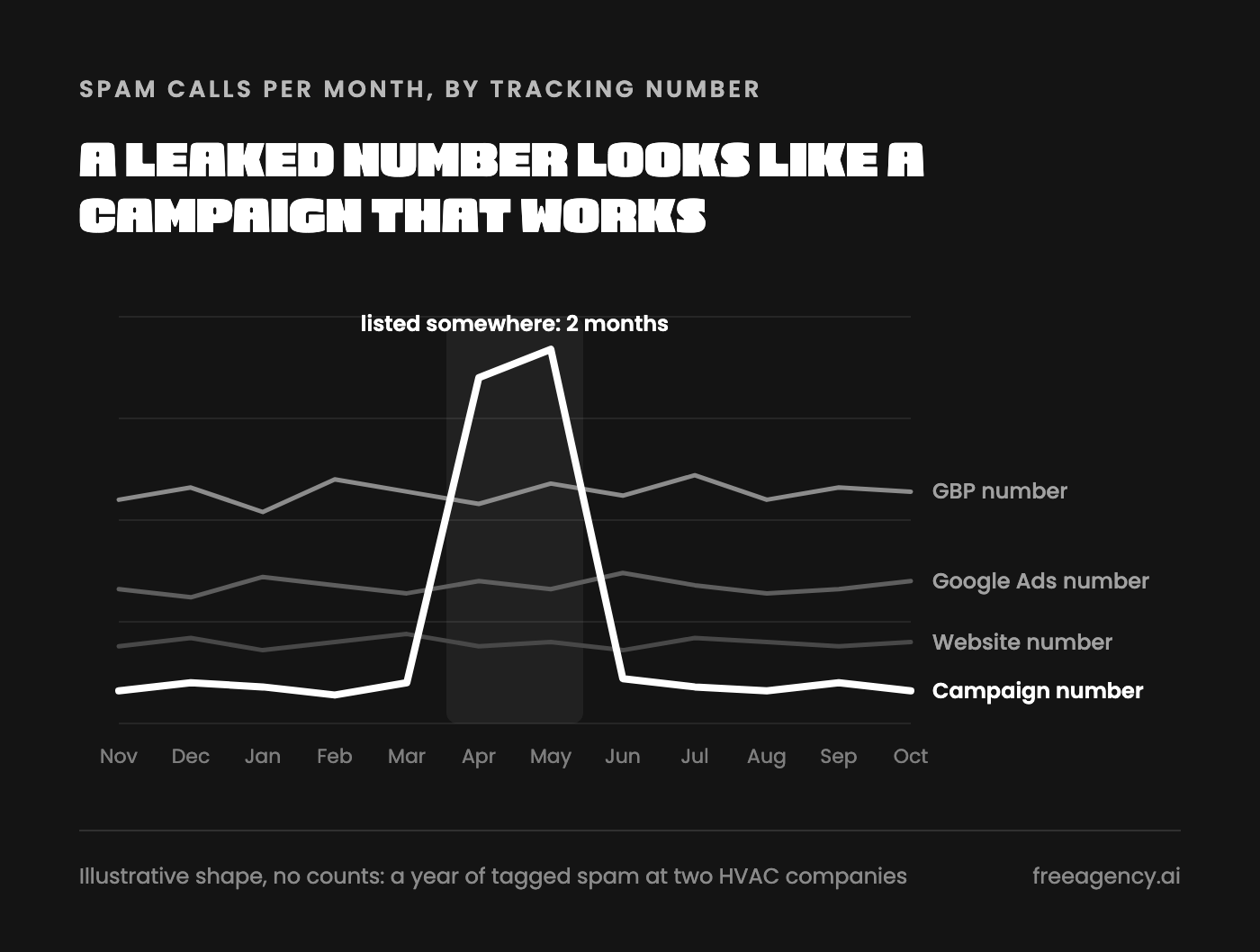
And the junk isn’t spread evenly. About three quarters of all spam landed on just three tracking numbers, with the Google Business Profile number taking the biggest share. One campaign’s tracking number went from a couple dozen spam calls a month to well over a hundred, two months running, then dropped back. Nothing about the campaign changed. The number got scraped or listed somewhere, and on the channel report that campaign looked like it was working.
How to mitigate it to optimize toward real leads
The goal isn’t a quieter phone. It’s making sure the report uses real leads, the platforms learn from real leads, and you’re not paying for the rest. Here’s how, in order.
Put CAC on page one. Every report should lead with CAC by channel, with first-time customers as the denominator. Cost per lead, booking rate and cost per job move to page two, as diagnostics for why CAC moved.
Then report cost per lead from ServiceTitan, not cost per conversion or cost per call. A lead is a call or form your CSR dispositioned as a lead, by campaign. Conversions are whatever the platform decided counted. Calls are every ring. If your report doesn’t say which one it’s using, it’s almost always one of the last two, because they’re bigger and cheaper. Read honestly, this is the number that tells you whether a CAC change came from marketing or from the phones.
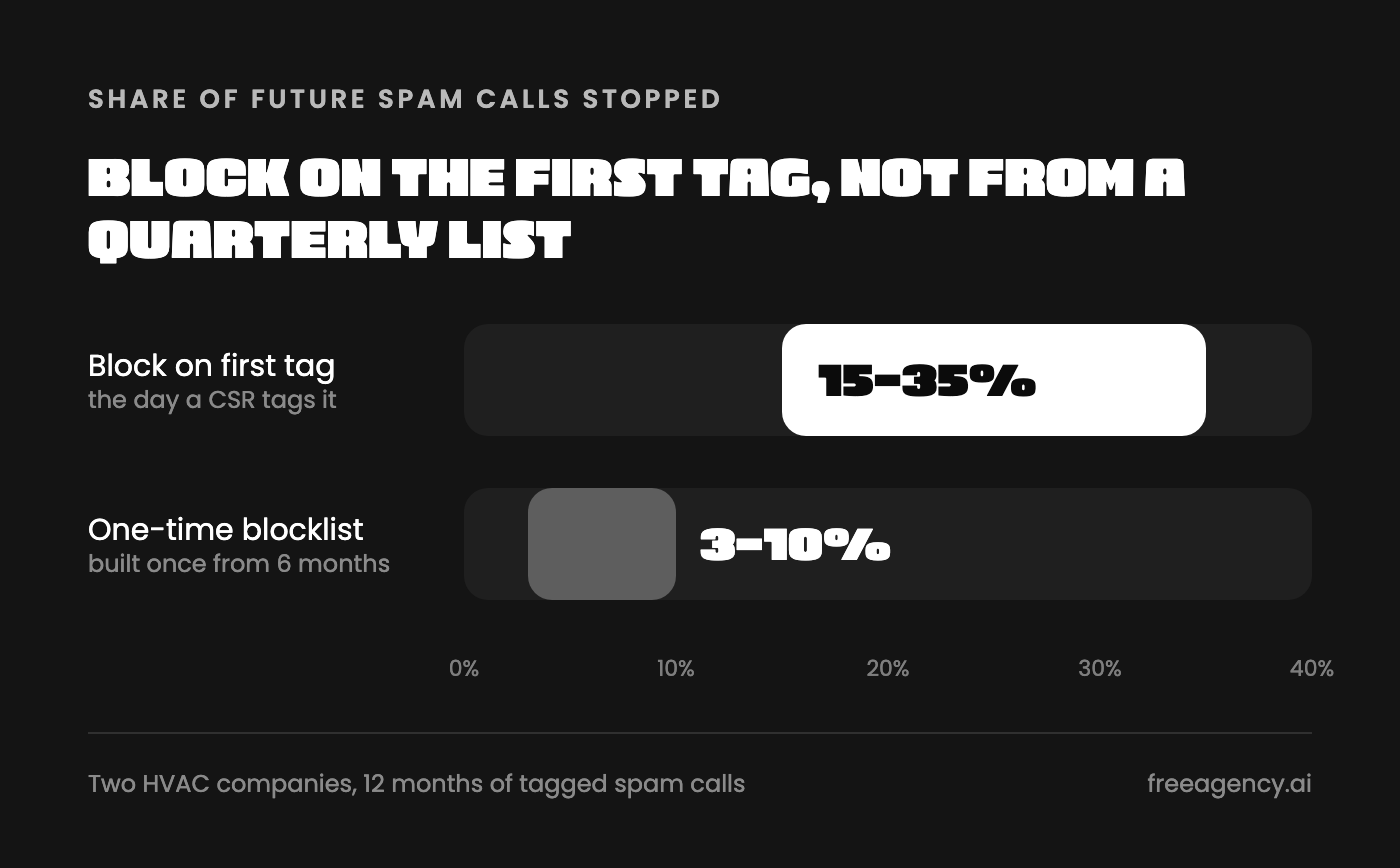
Block on the first tag, not from a quarterly list. In our study, blocking each spam number the day a CSR tagged it would have stopped 15% to 35% of spam. A blocklist built once from six months of data stopped 3% to 10% of the next six months. Spammers rotate numbers, but the ones that repeat come in bursts over days or weeks. Block on the first tag and you catch the burst on call two. Export once a quarter and the burst is over before your list exists.
The top of that range needs a footnote. At one company, a single robodialer called well over 100 times in under a week. Take it out and block-on-first-tag still stops spam in the high 20s, several times what the one-time list caught. So the honest claim is “up to a third.” Anyone telling you 40% is rounding in their own favor.
Plug the leaking number. Find the tracking number carrying the most spam, or the one that spiked, and swap it on the source that leaked. An email footer or directory listing costs nothing to change. A Google Business Profile number is different, because it’s part of listing consistency and attribution history, so skip the vendor advice to rotate tracking numbers every few weeks. Swap the number that leaked, where it leaked, and compare the next 30 days to the last 30.
Send only real leads back to the ad platforms. This is the step that actually changes what you get next month. If every ring counts as a conversion, Google optimizes toward more rings. Set up ServiceTitan conversions so Google optimizes on revenue, and spam and vendor calls never teach the algorithm anything.
Flag what you were charged for. Since October 1, Google charges for a missed Local Services Ads call during business hours when the caller stays on the line more than 20 seconds, and about a third of the spam in our study ran past 20 seconds. Google says it filters spam and credits low-quality leads automatically over a 30-day review. What it misses stays billed, and the feedback survey on each lead is how you flag it. If you’ve heard the credits went away, LSA credits are not dead. Somebody just has to flag them.
Audit the tags before anything gets blocked. All of this depends on CSRs tagging spam and vendor calls honestly. Instant-block the spam tag only, because the vendor tag includes suppliers you want to hear from. And spot-check spam tags weekly, because if a CSR marks a real homeowner as spam, first-tag blocking means that homeowner never gets through again.
The 10-minute version you can run yourself
You don’t need us for any of this. Fix the reporting ask, export your calls, let Claude find the repeats and the leak, start blocking on first tag, and put a real number next to the one on your report.
1. Text your agency. Copy this: “Starting next month, please lead the report with CAC by campaign: total spend divided by first-time customers. Below that, show cost per lead using ServiceTitan’s lead count, next to the platform conversions you’ve been reporting, for last month, so I can see the difference.” The size of that difference tells you a lot. So does how they respond.
2. Export the calls report. Pull the ServiceTitan calls report for the last 12 months. Keep date, campaign, caller phone number, duration, call reason and call type. Filter to excused calls: spam, vendor and marketing.
3. Hand it to Claude. Upload the export and paste this:
Count excused calls by caller phone number and list every number that called 2 or more times. Tell me what share of all excused calls came from a number that had already called before. Then group spam calls by campaign and by month, and flag any campaign where spam jumped well above its normal month.4. Block the repeats, then change the habit. Block every repeat spam number today, then each new one the day it’s tagged. If your phone system can’t block from the call log, export weekly and block in a batch. Weekly gets you close to the first-tag result. Quarterly gets you the 3% to 10% result.
5. Swap the leaking number on the source that leaked. If the line taking the spam is your LSA number, open its charged leads instead and flag the spam in each lead’s feedback survey.
6. Get a rough cost per new person. Pull a second export: every call for the same month, not just excused ones, plus your customer list from before that month. Then ask Claude:
Remove every call tagged spam, vendor or marketing. Collapse the remaining calls to unique caller phone numbers. Flag any caller whose number matches a customer on the customer list. Tell me how many unique callers were left who were not already customers, by campaign.Divide what you spent that month by that last number. It’s rough, because a homeowner who called from two phones counts twice and form fills aren’t in it. But put it next to the cost per lead on your report, and you’ll know how much of the report was rings and how much was people.
Then take it one step further: divide the same month’s spend by the number of first-time customers who paid you. That’s your CAC, and nothing upstream of the invoice can pad it. (If you’d rather not run these every month, our software calculates both daily, as cost per new person and CAC.)
Cost per lead, booking rate and cost per job each get flattered from somewhere. CAC only moves when someone new pays you.
Get it in your inbox, every Friday.
2,000+ trades owners already read it. Unsubscribe any time. @freeagency.ai on TikTok
Keep reading
More plays
We turned our CMO playbook into software. Here’s exactly what’s in it, and what it costs.
Most of the people reading Free Advice Fridays will never hire one of our CMOs.
Read the play
Pantheon 2026, what’d I miss? Five numbers from Orlando that change your marketing math
The Homepros team counted the word “AI” at ServiceTitan Pantheon 2026. It came up 133 times, and that was just the conversations they were standing near.
Read the play
Roto-Rooter just spent $3.1 million more to get fewer leads
Nobody in this industry shows you their lead counts. Not the consolidator buying up your market.
Read the play